
The KPIs Your Brand Should Monitor in Shopify and Google Analytics
As the person steering your brand, you know that success isn't measured only at the end of the month. Your website's day-to-day activity is a living organism, full of vital signs that tell you whether you're on the right track or need an adjustment.

Beyond Sales: The Importance of Your Website's Daily Pulse
As the person steering your brand, you know that success isn't measured only at the end of the month. Your website's day-to-day activity is a living organism, full of vital signs that tell you whether you're on the right track or need an adjustment.
Understanding what to look at and where to find it each morning can make a huge difference. We're not talking about getting lost in a sea of data, but about identifying the essential KPIs (Key Performance Indicators) in Shopify and Google Analytics that will give you the true pulse of your business. A 5-10 minute "daily checkup" that empowers you.
Shopify: Your Operational Dashboard
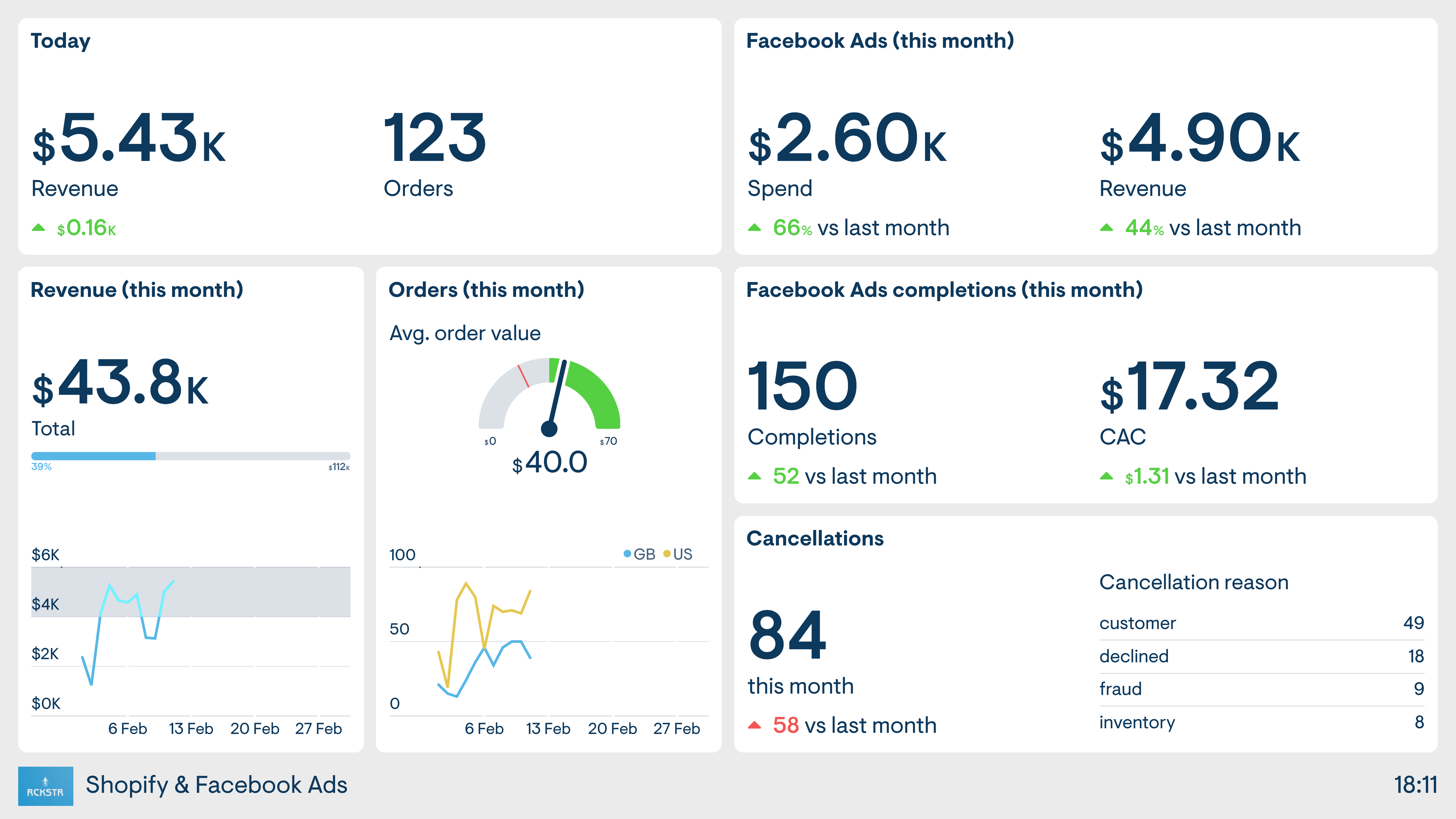
Shopify is the heart of your online store, your operations center. Its data gives you an immediate view of what's happening with your sales and customers, right where the action takes place.
Essential Daily KPIs in Shopify:
- Total Sales: The most obvious number, but a fundamental one. Are you meeting your daily or weekly expectations? Is there an unexpected spike or a drop that needs your attention?
- Number of Orders: Goes hand in hand with sales. Are you generating the transaction volume needed to meet your goals?
- Average Order Value (AOV): How much does each customer spend on average per purchase? If this value changes, it's a sign that something in your offers or customer behavior is shifting.
- Conversion Rate (CR): [In the Shopify dashboard, sometimes displayed as "Convert visitors into customers"]. This percentage tells you how many of your visitors become buyers. If it drops, it's a red flag to investigate what's happening on your website.
- Abandoned Carts (and recovered carts): How many potential sales are left unfinished? Shopify clearly shows you this data. Monitoring it lets you see how effective your cart recovery strategies are.
Quick Takeaway from Shopify: A sudden drop in sales or conversion, or an alarming spike in abandoned carts, are signs that require immediate investigation. Shopify gives you an early warning.
Google Analytics: Understanding the "Why" Behind the Numbers
If Shopify tells you "what" is happening in your store, Google Analytics helps you understand "why". It's your strategic magnifying glass for understanding your visitors' behavior before and during their journey through your website.
Essential Daily KPIs in Google Analytics:
- Users / Sessions (Total Traffic): How many people visit your website? And more importantly, where do they come from? (Channels: Organic, Direct, Referral, Social, Paid). If your traffic decreases, your sales will too; if it increases, it's time to optimize for conversions.
- Average Session Duration: How much time do users spend on your website? A drop may indicate that your content isn't engaging or that there are usability issues.
- Page Views per Session: How many pages do your visitors explore? A low number may signal confusing navigation or a lack of interest in what you offer.
- Bounce Rate: The percentage of visits where users view only one page and leave without any further interaction. A high bounce rate, especially on your key pages (home, categories, products), may indicate that you aren't attracting the right audience or that the content doesn't meet their expectations.
- Page Behavior (Most Visited Pages / Exit Pages): Which content performs best? And where do users leave your website? This helps you optimize the customer's "path".
- Devices: Do most of your users arrive from mobile, tablet, or desktop? Making sure your website offers a flawless experience on the most-used device is vital.
Quick Takeaway from Google Analytics: If traffic drops unexpectedly, the bounce rate soars, or session duration falls, it's time to review your marketing campaigns, your SEO strategy, or your website's usability and design.
Your Daily Review Routine (Teipe Digital's Quick Guide)
You don't need a full audit every day. A quick, consistent review is what really counts:
- Review recent Orders and Abandoned Carts. Is there anything urgent that needs your attention?
- Explore Behavior > Site Content > All Pages for the most-viewed pages and exit pages. - Visit Audience > Technology > Mobile > Overview for performance by device.
- Step 1: Shopify First: - Go to the Dashboard. Review Sales, Orders, AOV, and Conversion Rate. Look for any anomalies.
- Step 2: Google Analytics Next: - Navigate to Audience > Overview for total traffic and its sources.
- Key Question at the end of each review: "What has changed today and why?"
Constant Monitoring Means Growth
Reviewing your KPIs daily isn't an obsession; it's optimization. It allows you to be proactive, detect problems before they escalate, and capitalize on opportunities instantly. It's your business speaking to you in its own language, and learning to listen empowers you.
This data gives you the power to adjust your campaigns in real time, modify key elements of your website, or even adapt your inventory, all with the aim of improving your customer experience and, ultimately, boosting your results.
At Teipe Digital, We Make Your Data Speak
Understanding your metrics is the first step toward sustained growth. At Teipe Digital, we don't just teach you to read the numbers; we help you create the strategies that will make them shine. We transform complex data into clear decisions and tangible results.
Do you need a digital strategy that optimizes your Shopify store and your metrics, taking them to the next level?
Let's talk about your KPIs!

Want to sell more online? We'll run a free diagnosis of your ecommerce
Get my diagnosisReady to grow your brand?
We review your ecommerce and identify opportunities to grow with Shopify.
Let's talk →Learn more about our service: Ecommerce build
You may also like

From PrestaShop to Shopify in 2026: When to migrate and what you can gain from the switch

Shopify vs WooCommerce in 2026: Which platform should you choose to grow your eCommerce business?
